How to Monitor Claude, Gemini & OpenAI API Usage in Your Mac Menu Bar
On this page
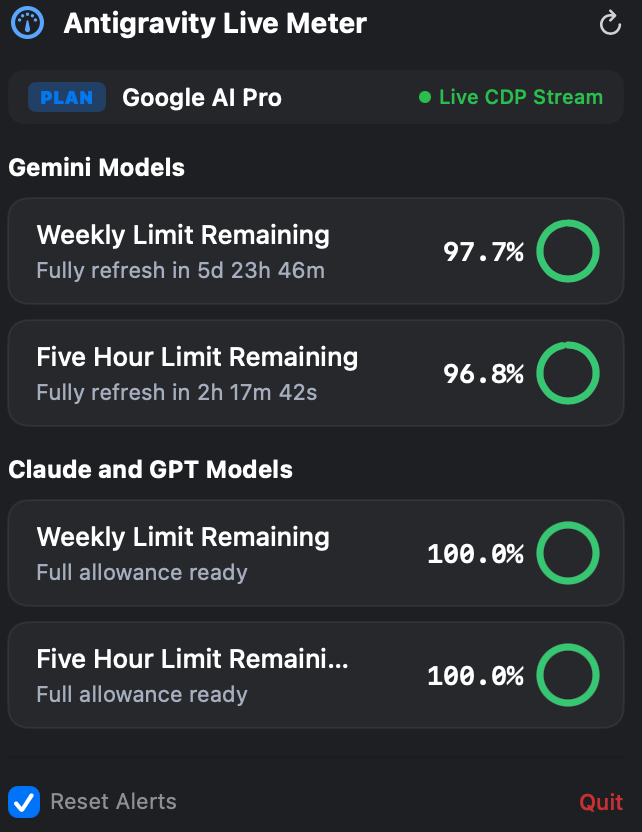
Track real-time token quotas, rolling 5-hour burst replenishment windows, and reset countdown timers natively in macOS. Eliminate sudden 429 lockouts with zero Electron overhead.
⚡ Executive Summary: The AI Engineering Friction
- Sudden Rate Limits Halt Autonomous Agents: Running autonomous agents in Cursor, Claude Code, or Google Antigravity consumes thousands of tokens per minute. Hitting a hard
HTTP 429 Too Many Requestserror halts multi-file refactors and causes context loss. - The 5-Hour Rolling Limit Trap: Anthropic Claude Pro and Google Antigravity enforce dynamic 5-hour rolling usage windows. They do not reset at midnight. Without live countdown telemetry, you cannot predict when your quota returns.
- Invisible Reasoning Tokens Burn Quotas 3x Faster: OpenAI o1 and o3-mini models generate thousands of hidden thinking tokens per prompt. These tokens count toward Tokens Per Minute (TPM) limits and bill at completion rates ($4.40 to $60.00/1M tokens).
- Native Swift Outperforms Electron Trackers: Native AppKit menu bar utilities consume under 15MB RAM and 0.01% idle CPU. Electron-based wrappers consume 300MB to 500MB RAM, drain laptop batteries, and compete with build compilers.
- Zero-Cloud Privacy Architecture: Never paste sensitive API keys into third-party cloud dashboards. Use a local-first utility like Antigravity Status Meter that communicates strictly over localhost (127.0.0.1) via Chrome DevTools Protocol.
Table of Contents
1. Multi-Provider Quota Mechanics: The 2026 Landscape
Modern AI development environments no longer execute single prompt-and-response calls. Modern engineers run autonomous agent loops across Claude Code, Cursor IDE, and Google Antigravity. These systems read dozens of workspace files, generate multi-turn plans, execute terminal commands, and loop iteratively until tests pass.
Each API provider enforces rate limits through three distinct regulatory dimensions:
Requests Per Minute (RPM)
Caps total concurrent API requests. When an autonomous agent dispatches 10 parallel subagents, RPM limits trigger immediate 429 RateLimitError rejections.
Tokens Per Minute (TPM)
Measures input, output, and internal reasoning tokens processed every 60 seconds. Sending whole codebases into context windows exhausts TPM limits rapidly.
Rolling Burst Quota Windows
Anthropic and Google Antigravity enforce dynamic 5-hour rolling volume buckets. Quota replenishes progressively as older calls exit the rolling time window.
2. Anthropic Claude: The 5-Hour Rolling Usage Window
Anthropic enforces different tier limits for Claude API keys (Tier 1 through Tier 4) and subscription products (Claude Pro and Claude Code). While API tiers provide high raw TPM (up to 400,000 TPM for Tier 4), subscription plans enforce a strict 5-hour rolling usage window.
This rolling window is not a daily reset. It computes the total number of tokens sent over the last 300 minutes. If you run an intense coding sprint at 10:00 AM, your quota reaches capacity by 11:30 AM. You cannot resume until 3:00 PM, when the earliest 10:00 AM token blocks expire.
HTTP Response Header Telemetry
Anthropic returns real-time rate limit telemetry in every API response header:
anthropic-ratelimit-requests-remaining: 48
anthropic-ratelimit-tokens-remaining: 184200
anthropic-ratelimit-requests-reset: 2026-09-07T12:45:00Z
anthropic-ratelimit-tokens-reset: 2026-09-07T12:45:00Z
Native telemetry utilities parse these headers to calculate exact time remaining before limits reset.
⚠️ The Context Window Compounding Trap
Every time you send a message in a multi-turn conversation, the client re-sends the entire preceding conversation history. On turn 1, you send 2,000 tokens. By turn 15, each single prompt re-submits 45,000 tokens of accumulated history. In an unmonitored session, five rapid questions can consume 250,000 tokens in 10 minutes, triggering an immediate 5-hour lockout.
3. Google Antigravity & Gemini Quota Architecture
Google Antigravity orchestrates autonomous software engineering agents across complex workspaces. To protect backend compute allocations (Gemini 2.5 Pro and Gemini 2.5 Flash), Antigravity monitors model allocations through two parallel metrics: aggregate model quota and rolling 5-hour burst limits.

How Antigravity Telemetry Works Locally
Unlike web portals that require manual browser logins, Google Antigravity generates a local runtime port descriptor upon startup:
A native Swift utility connects directly to this local debugging port over 127.0.0.1 using the Chrome DevTools Protocol (CDP). It streams live quota balances and reset countdown timers without making external cloud API calls.
Gemini API Pay-As-You-Go vs. Antigravity Quotas
Standard Google AI Studio API keys operate under standard RPM and TPM limits (Gemini 2.5 Flash provides 1,000 RPM and 4,000,000 TPM on pay-as-you-go). Antigravity integrates these high-capacity models directly into an autonomous agent loop. When parallel subagents execute concurrent refactors, monitoring your rolling 5-hour buffer prevents unexpected agent failure midway through file writes.
4. OpenAI: The Hidden Reasoning Token Multiplier
Developers migrating from GPT-4o to reasoning models (o1, o1-mini, and o3-mini) frequently experience sudden rate limit rejections and unexpected billing spikes. This occurs because reasoning models process invisible internal tokens.
| Model | Input Price / 1M | Output Price / 1M | Reasoning Token Billing | Quota Burn Velocity |
|---|---|---|---|---|
| GPT-4o | $2.50 | $10.00 | None (Direct Output) | Baseline (1.0x) |
| GPT-4o-mini | $0.15 | $0.60 | None (Direct Output) | Ultra-Low (0.1x) |
| o3-mini (High Effort) | $1.10 | $4.40 | Billed at $4.40/1M output | High (3.5x–5.0x) |
| o1 (Full Reasoning) | $15.00 | $60.00 | Billed at $60.00/1M output | Extreme (8x–12x) |
🔍 The Invisible Token Math
When you submit a concise 200-word debugging question to o1, the model may return a 150-word solution. However, to formulate that solution, the model internally computed 12,000 reasoning tokens. Because reasoning tokens count against your Tokens Per Minute (TPM) allocation and bill at the full $60.00/1M output rate, that single prompt consumed $0.72 USD and burned 12,350 tokens from your organization TPM ceiling.
5. Native Swift AppKit vs. Electron Bloat
Many desktop utilities wrap web applications using Electron or Chromium embedded frameworks. While convenient for cross-platform developers, running an Electron tracker in the macOS menu bar wastes valuable hardware resources.
| Architecture Metric | Native Swift 6 / AppKit (Status Meter) | Electron / Chromium Wrappers | Engineering Advantage |
|---|---|---|---|
| Idle RAM Consumption | 12 MB – 18 MB | 350 MB – 550 MB | 96% Memory Reduction |
| Idle CPU Utilization | 0.00% – 0.01% | 1.5% – 4.0% | Zero CPU contention during builds |
| Battery / Power Impact | Undetectable (< 0.1W) | Continuous timer wakeups | Prevents laptop battery drain |
| Binary Disk Footprint | 3.2 MB | 180 MB – 260 MB | Instant 3-second compilation |
| Credential Storage | macOS Keychain (Encrypted) | Plaintext JSON / LocalStorage | Hardware Secure Enclave protection |
6. Token Pricing & Prompt Caching Economics
Understanding prompt caching economics is the most effective way to reduce AI engineering expenditures. Anthropic, Google Gemini, and OpenAI now support prompt caching, which caches repetitive context (system instructions, tool declarations, repository file maps) in GPU memory.
The 90% Prompt Cache Discount
On Claude 3.7 Sonnet, base input tokens cost $3.00 per 1M. When context is written to cache, Anthropic bills $3.75 per 1M (a 25% write premium). However, subsequent agent turns that read from cache cost only $0.30 per 1M tokens—a massive 90% cost reduction!
In an agent session with a 40,000-token system prompt executing 20 multi-file iterations:
• Without Prompt Caching: 20 turns × 40,000 tokens × $3.00/1M = $2.40 USD.
• With Prompt Caching: Turn 1 write ($0.15) + 19 turns × 40,000 × $0.30/1M ($0.23) = $0.38 USD (84% net savings).
7. Local-First Security & Keychain Storage
Entering production API keys into third-party web services or cloud telemetry dashboards presents severe security vulnerabilities. If a telemetry vendor experiences a data breach or misconfigures an S3 storage bucket, attackers obtain your API credentials and can run unauthorized workloads.
A secure telemetry tool must follow a strict local-first architecture:
- Zero Cloud Intermediary: Direct HTTPS calls from localhost to
api.anthropic.comorapi.openai.com. - macOS Keychain Services: Sensitive keys are stored via the native
SecItemAddAPI, protected by Apple's hardware Secure Enclave. - No Telemetry Phone-Home: Zero analytics SDKs, zero Mixpanel, and zero telemetry pings.
8. 4-Step Menu Bar Setup Runbook
Deploy Antigravity Status Meter via Terminal
Open Terminal on macOS and execute the official automated build command:
This compiles the native Swift 6 binary in ~3 seconds and places AntigravityQuotaMeter.app directly into your /Applications directory. Alternatively, download the pre-compiled .zip release from GitHub.
Configure Direct CDP WebSocket Connection
Launch Antigravity Status Meter from Spotlight or Applications. The application automatically locates your local Antigravity runtime port descriptor and establishes a persistent, zero-latency WebSocket session. Your current model quota and rolling 5-hour burst balance appear in the top menu bar immediately.
Establish Quota Exhaustion Alerts & Reset Thresholds
Click the menu bar icon to open the popover dashboard. Enable native macOS notification banners. The utility provides dynamic visual cues:
• Emerald Green: Quota healthy (>50% remaining).
• Amber Warning: High token consumption (20%–50% remaining).
• Red Critical Alert: Depleted quota (<20% remaining). Audio chime and notification fire, displaying exact reset countdowns down to the second (HH:MM:SS).
Optimize Model Switching & Agent Runways
When the menu bar transitions to Amber or Red, execute rapid model shifting:
• Shift routine test writing and documentation to Claude 3.5 Haiku ($0.80/1M) or Gemini 2.5 Flash ($0.075/1M).
• Reserve Claude 3.7 Sonnet or o3-mini strictly for complex architectural design.
• Leverage prompt caching to eliminate redundant system prompt re-evaluations.
9. Workflow Integration: Cursor, Claude Code & Multi-Agent Systems
When editing across multiple monitors or full-screen IDE layouts in Cursor, VS Code, or Antigravity, IDE-specific status panels get buried under terminal splits and debugging consoles. A native menu bar utility sits in your peripheral vision continuously.
Before launching long autonomous agent batches (such as unit test generation across 50 components), glance at your menu bar. If your 5-hour burst window displays <25%, pause the batch until the next hourly replenishment block expires. This simple operational check prevents broken partial commits and corrupted workspace states.
Deploy Antigravity Status Meter for macOS
Download the free, open-source macOS utility engineered for AI developers. Stream live model quotas, track rolling 5-hour bursts, and see real-time reset countdowns in pure native Swift.
Frequently Asked Questions
How can I monitor Claude and OpenAI API usage in my Mac menu bar?
You can monitor live Claude, Gemini, and OpenAI API usage by installing a native macOS menu bar utility like Antigravity Status Meter. The application displays your current quota balance (e.g., ⚡️ 97%), rolling 5-hour replenishment burst limits, and live countdown timers directly in the macOS status bar without requiring you to switch windows or open web dashboards.
How does the Claude 5-hour rolling usage limit work?
Anthropic's 5-hour rolling window measures token and message volume over a dynamic, moving 300-minute block rather than resetting at a fixed time of day. When you send messages or run automated coding agents, tokens consume your burst capacity. Capacity replenishes continuously as older messages exit the 5-hour window. A native status meter tracks the oldest consumed blocks and computes the exact countdown until full quota replenishment.
Is it safe to put API keys into a Mac menu bar utility?
It is safe only if the utility operates on a strict local-first, zero-cloud architecture. Antigravity Status Meter never transmits API keys to third-party proxy servers or cloud analytics. It inspects local runtime ports via Chrome DevTools Protocol over localhost (127.0.0.1) and stores credentials encrypted at rest in the hardware-backed macOS Keychain. You should never input API keys into web-based or closed-source cloud SaaS trackers.
Why do o1 and reasoning models burn through API quotas so quickly?
OpenAI o1 and o3-mini models generate hidden 'reasoning tokens' (internal chain-of-thought) before outputting their final response. While invisible in standard chat interfaces, these reasoning tokens count directly against your organization's Tokens Per Minute (TPM) limit and are billed at full completion token rates ($4.40 to $60.00 per 1M tokens). A single complex debugging prompt can produce 8,000 to 16,000 hidden reasoning tokens, exhausting hourly quotas 3x to 5x faster than standard GPT-4o.
What is the advantage of a native Swift menu bar app over an Electron app?
Native Swift apps built with AppKit (NSStatusBar and NSStatusItem) consume under 15MB of RAM and virtually 0% idle CPU, causing zero measurable battery drain. In contrast, Electron-based menu bar utilities bundle an entire Chromium browser and Node.js runtime, consuming 300MB to 500MB of RAM and 2% to 5% continuous CPU. Running multiple Electron background apps drains laptop battery life and competes with IDE compilation tasks.
Related Software & Engineering Infrastructure Playbooks
Antigravity Status Meter
Explore our native macOS menu bar app. Real-time model quotas, 5-hour burst monitors, and zero-telemetry local privacy.
Southeast Asia Cost of Living
Benchmark monthly engineering runway across Thailand, Vietnam, Bali, and the Philippines. Real condo rents and utilities.
Expat Banking Playbook
Wise vs. Revolut vs. Charles Schwab. Learn how to manage cross-border developer SaaS subscriptions with 0% foreign transaction fees.

Kevin Jaewoong Jeong
Founder & Systems Architect, Jeong Inc. • AI Systems Engineer
Kevin designs sovereign software architecture, autonomous multi-agent systems, and native macOS engineering tools. He built Antigravity Status Meter to provide clean, zero-cloud telemetry for developers running high-throughput AI agent workflows.