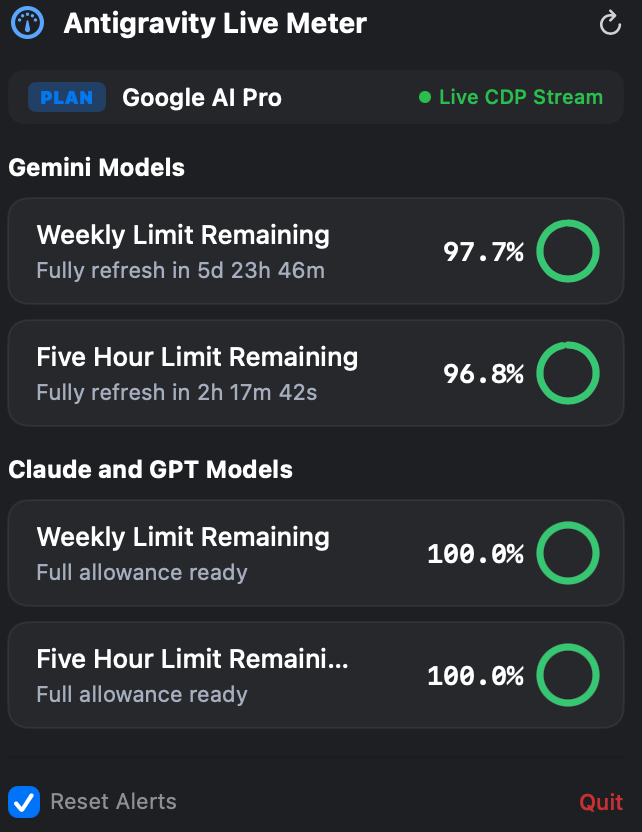
A lightweight, native Swift menu bar application that monitors live Google Antigravity quotas, rolling 5-hour burst budgets, and real-time reset countdowns without interrupting your engineering flow.
See both your aggregate model quota and rolling 5-hour burst limits right from your menu bar without digging through IDE menus or browser portals.
Discreetly sits in the top macOS bar with live battery-style color states (Green, Amber, Red).
Click to view live radial gauges and down-to-the-second reset countdown clocks.
Engineered specifically for developers running heavy Google Antigravity autonomous coding sessions.
Displays your active model quota balance directly on screen (e.g. โก๏ธ 97% (5h: 96%)). Never hit unexpected rate limits midway through multi-agent tasks.
Connects directly via Chrome DevTools Protocol to Antigravity's local debugging port. Zero cloud dependencies, zero external network calls, and instant response times.
Real-time ticking timers down to the exact second (HH:MM:SS) for both your 5-hour replenishment burst and weekly quota refresh cycles.
Sends system banner alerts the exact moment your 5-hour limit or weekly quota pool refreshes to 100%, so you can resume intensive agent workflows immediately.
Color-coded visual cues matching Antigravity design standards: Emerald Green for healthy allocations (>50%), Amber during heavy consumption (20โ50%), and Red when depleted (<20%).
Written 100% in native Swift with direct AppKit integration. Consumes under 15MB of RAM and virtually 0% CPU, leaving all system resources available for agent compilation.
How Antigravity Status Meter operates strictly within your local machine sandbox.
The meter securely inspects the local runtime port descriptor generated by Antigravity under ~/Library/Application Support/Antigravity/DevToolsActivePort.
Establishes a local WebSocket link over localhost (127.0.0.1) directly to the renderer context using Chrome DevTools Protocol.
Parses quota thresholds and feeds live telemetry to the macOS status bar item with zero external telemetry or third-party server relay.
Choose the setup workflow that matches your development environment.
Compiles directly on your Mac using built-in swiftc in ~3 seconds. Automatically circumvents macOS Gatekeeper quarantine flags.
Install and manage updates seamlessly via the official Jeong Inc. Homebrew tap.
Download the pre-compiled universal binary directly from GitHub releases and drag into /Applications.